 Atlas Documentation
Atlas Checkout
Create checkout URLs via the Atlas API to collect payments from customers, configure redirect URLs, and handle payment confirmation webhooks.
When your customers are ready to complete a payment for a good or certain services, you can create a checkout for them using the Initiate Checkout endpoint. This endpoint creates a dedicated checkout page and returns a URL to it.
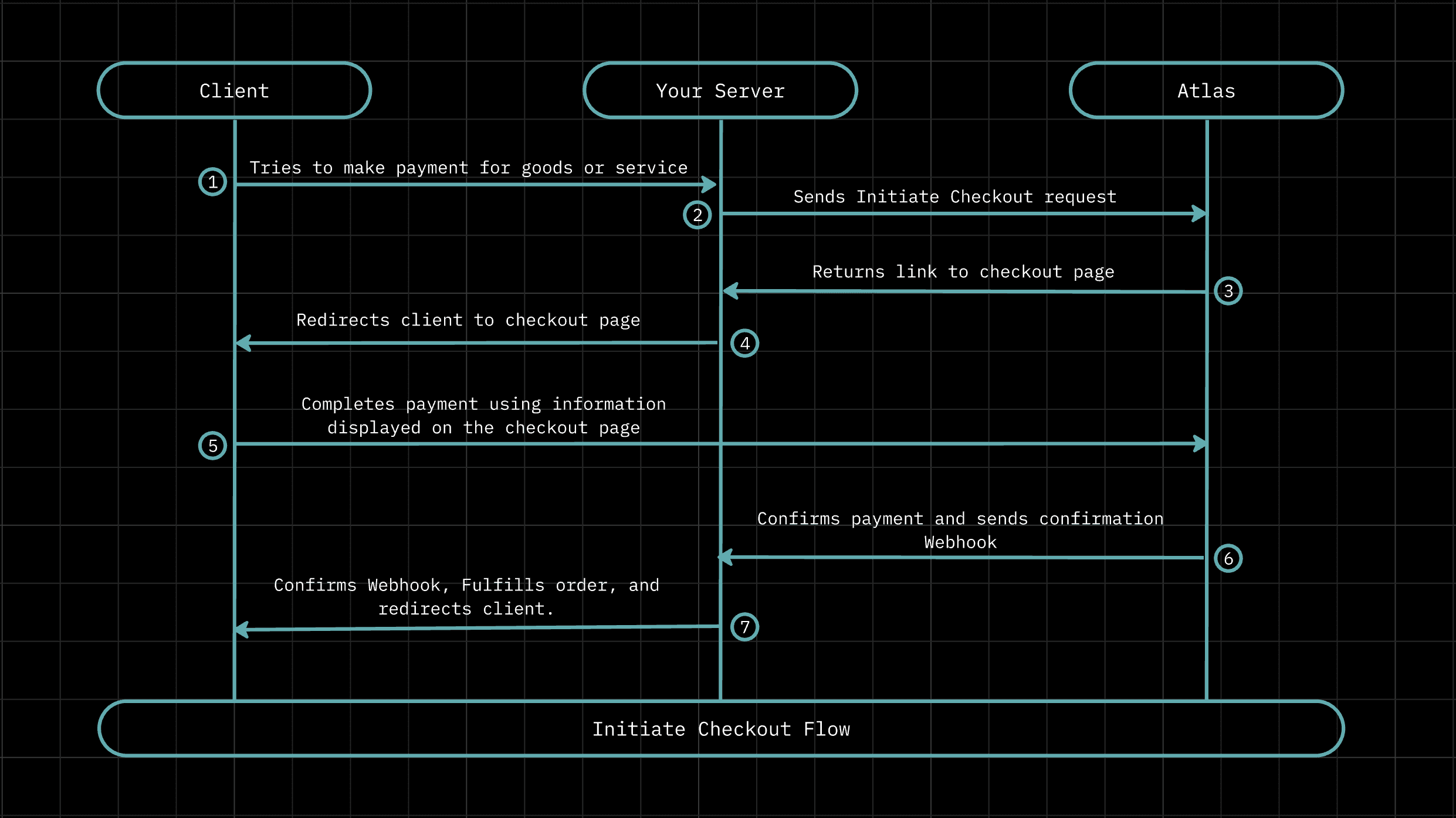
On the checkout page, the customer will be required to make payment using their preferred payment method. After their payment is confirmed by Atlas, you will receive a webhook that confirms the transaction.
Creating a checkout URL
The Initiate Checkout endpoint requires the amount for the transaction along with details about the customer making the payment,
first_name, last_name, and email. When the customer completes a payment using a checkout, Atlas automatically creates a customer account
using their details. You also need to provide the currency the transaction is in and a source_reference, a unique string that you can use to track the checkout on your own server.
Info
Customers created from checkout do not have dedicated virtual accounts. To provision a virtual account for a customer created from a checkout, use the Create Customer Virtual Account endpoint with the customer's reference ID. See Attaching a virtual account to an existing customer for details. You can also add a virtual account to their account using the Atlas UI.
The endpoint has a few optional parameters which include:
-
redirect_url: The customer will get redirected to this URL after they successfully complete a payment. You can set the default value of the redirect URL from your Atlas dashboard . -
description: A description of the goods/services being paid for.
Note
This request requires that you are authenticated. You can find your authentication (API Key) on your Atlas dashboard.
After building your request payload make a POST request to the Initiate Checkout endpoint, like so:
curl -X POST "https://atlas.tryduplo.com/api/v1/checkout/initiate" \
  -H "Authorization: Bearer <YOUR_API_KEY>" \
  -H "Content-Type: application/json" \
  -d '{
    "currency": "NGN",
    "first_name": "John",
    "last_name": "Doe",
    "email": "john.doe@example.com",
    "amount": 200,
    "source_reference": "SRC_ABC123XYZ"
  }'
Optionally, you can enhance the security of this request by encrypting it before you send it. On a successful request, you should receive a response similar to the one below:
{
  "requestId": "aa0e750e-c0bd-4052-b6be-1fc50469c0b9",
  "requestTimestamp": "2025-12-11 09:58:09",
  "message": "Checkout Transaction Initiated successfully.",
  "statusCode": 200,
  "data": {
    "checkoutUrl": "https://checkout.tryduplo.com?ref=CHK_WCOVJHSCYV",
    "checkoutReference": "CHK_WCOVJHSCYV",
    "sourceReference": "SRC_ABC123XYZ",
    "amount": {
      "value": 200,
      "currency": "NGN",
      "formatted": "NGN 200"
    }
  }
}
Checkout payment options
Atlas currently supports the following payment options for checkout:
- Bank transfer
- Card
- OPay
You can enable and disable them as you wish but at every given time at least one payment option has to be activated for checkout on your account. To manage the payment options available to your customers on checkout, navigate to your Atlas Dashboard > Settings > Payment > Checkout Methods.
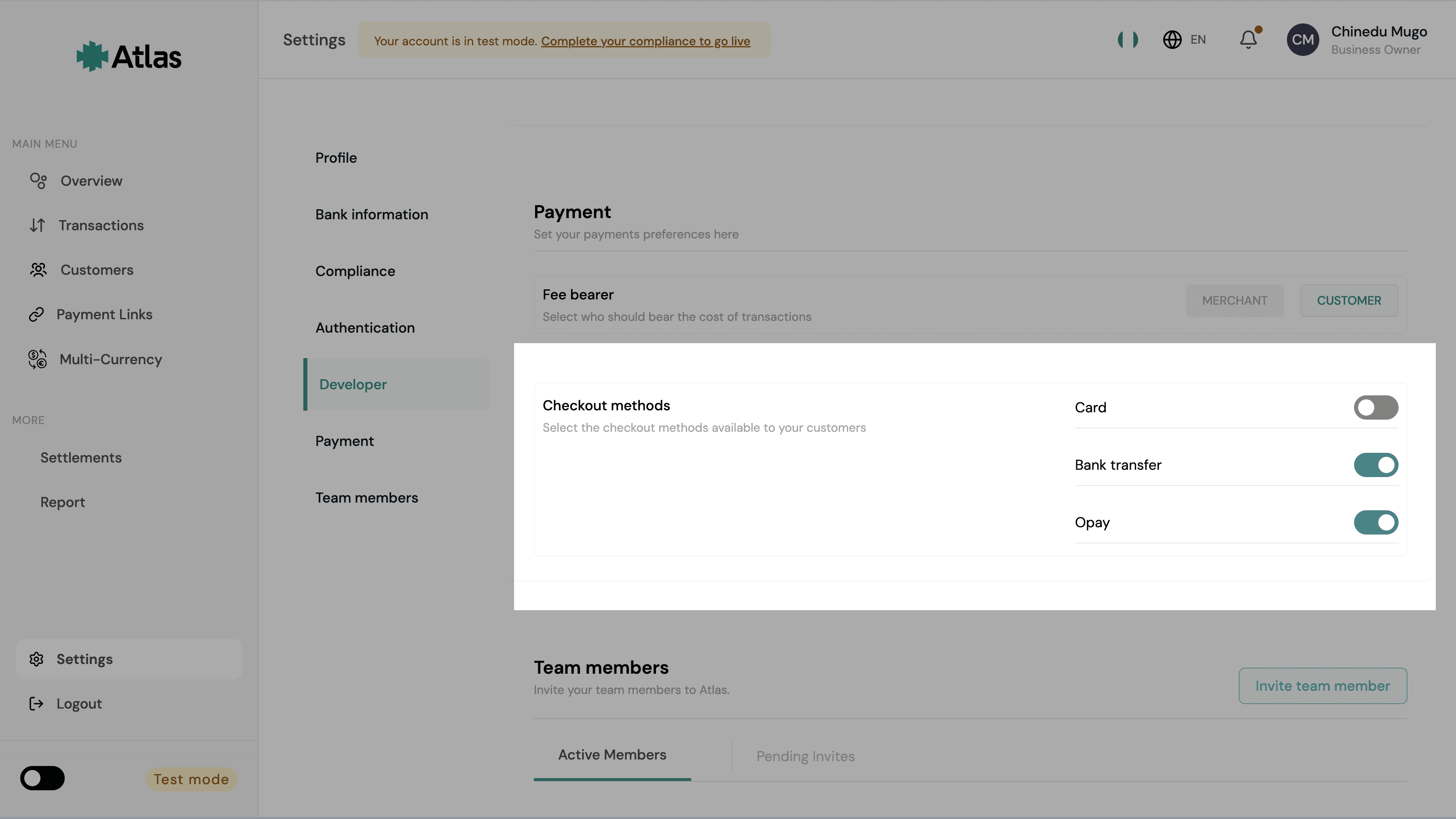
Bank transfers are settled immediately. However, card transactions are settled in T+1 days for local card transactions and T+7 for international card transactions, where T is the day the transaction is processed. Learn more about how settlements work and are handled on our Settlements guide.
Checkout lifecycle
Each checkout is a distinct payment session tied to a checkoutReference. A customer can attempt payment multiple times under the same checkout without a new checkout being created.
For example, if their card is declined, they can retry with a different method.
For each payment attempt, a new transaction is created under the checkout and is marked as failed if the attempt is unsuccessful. A checkout is considered complete on the first successful transaction.
Important
checkoutReference and transactionReference identify different things and
must never be treated as interchangeable. A checkout is the parent object and
can have many transactions underneath it. Always use checkoutReference to
track and verify the overall payment session.
A checkout can be in one of the following statuses:
active: the checkout is open and the customer can attempt payment.processed: an inflow has been received but not confirmed so the checkout is not yet fully complete.completed: one transaction succeeded and the checkout is fully complete. Safe to fulfill.failed: all transactions failed with no successful payment.cancelled: the checkout was terminated without a successful payment (abandoned, expired, manually cancelled, or risk-terminated).
Only when all attempts have failed with no inflow does the checkout move to failed.
Verifying a checkout
Use the verification endpoints to check the current state of a checkout at any time, or to reconcile payments if a webhook is missed.
The primary identifier for checkout verification is checkoutReference. Use it with the Verify Checkout endpoint:
curl -X GET "https://atlas.tryduplo.com/api/v1/checkout/verify-by-reference/CHK_WCOVJHSCYV" \
  -H "Authorization: Bearer <YOUR_API_KEY>"
You should get the response below:
{
  "requestId": "d0b36532-d7cb-45f3-bf4a-6bd65952624b",
  "requestTimestamp": "2026-04-13 09:35:16.050",
  "message": "Checkout status.",
  "statusCode": 200,
  "data": {
    "checkoutReference": "CHK_WCOVJHSCYV",
    "sourceReference": "1234r",
    "checkoutStatus": "completed",
    "paymentMethod": "bank_transfer",
    "isFinal": true,
    "businessId": "794c7640-c76d-4174-9509-7354335450e7",
    "customer": {
      "reference": "dp_cust_uhdzq5dq3etolxa",
      "email": "john.doe@example.com",
      "name": "John Doe"
    },
    "checkoutAmount": {
      "value": 200,
      "currency": "NGN",
      "formatted": "NGN 200"
    },
    "transactionAmount": {
      "value": 210,
      "currency": "NGN",
      "formatted": "NGN210"
    },
    "feeAmount": {
      "value": 10,
      "currency": "NGN",
      "formatted": "NGN10"
    },
    "successfulTransactionReference": "TRN_MLR94CZL5TDN",
    "latestTransactionReference": "TRN_MLR94CZL5TDN",
    "paymentChannel": "bank_transfer",
    "senderName": "duplo",
    "processedAt": "2026-04-13T09:31:00+00:00",
    "completedAt": "2026-04-13T09:31:01+00:00",
    "failedAt": null,
    "cancelledAt": null,
    "reason": null,
    "transactionsSummary": {
      "total": 1,
      "successful": 1,
      "failed": 0,
      "pending": 0
    },
    "transactions": [
      {
        "transactionReference": "TRN_MLR94CZL5TDN",
        "status": "successful",
        "channel": "bank_transfer",
        "amount": {
          "value": 210,
          "currency": "NGN",
          "formatted": "NGN210"
        },
        "reason": null
      }
    ]
  }
}
If you only have the source_reference from when you created the checkout, use the Verify Checkout by Source Reference endpoint instead.
Fetching checkout transactions
To retrieve all transaction attempts under a checkout, use the Get Checkout Transactions endpoint:
curl -X GET "https://atlas.tryduplo.com/api/v1/checkout/CHK_WCOVJHSCYV/transactions" \
  -H "Authorization: Bearer <YOUR_API_KEY>"
You should get a response similar to the one below:
{
  "requestId": "abcd1234-5678-90ef-1234-567890abcdef",
  "requestTimestamp": "2026-01-01 12:00:00.000",
  "message": "Checkout transactions fetched successfully.",
  "statusCode": 200,
  "data": {
    "checkoutReference": "CHK_WCOVJHSCYV",
    "sourceReference": "SRC_ABC123XYZ",
    "checkoutStatus": "completed",
    "paymentMethod": "bank_transfer",
    "transactionsSummary": {
      "total": 2,
      "successful": 1,
      "failed": 1,
      "pending": 0
    },
    "transactions": [
      {
        "transactionReference": "TRN_MLR94CZL5TDN",
        "status": "successful",
        "channel": "bank_transfer",
        "amount": {
          "value": 210,
          "currency": "NGN",
          "formatted": "NGN 210.00"
        },
        "feeAmount": {
          "value": 10,
          "currency": "NGN",
          "formatted": "NGN 10.00"
        },
        "senderName": "John Doe",
        "reason": null,
        "createdAt": "2026-01-01T12:00:00+00:00",
        "updatedAt": "2026-01-01T12:05:00+00:00"
      }
    ]
  }
}
The response includes all attempts under the checkout - successful, failed, and pending - ordered with the latest attempt first. If you only have the source_reference, use the Get Checkout Transactions by Source Reference endpoint instead.
Handling checkout webhooks
No webhook is sent when a checkout is created. Atlas sends webhooks only on meaningful lifecycle transitions. There are four checkout webhook events:
CHECKOUT_PROCESSED: inflow received. The checkout is not yet complete but you can fulfill at this stage.CHECKOUT_COMPLETED: checkout fully completed with a successful transaction.CHECKOUT_FAILED: all transactions under the checkout have failed with no successful payment. Note that a single failed transaction attempt does not trigger this event while the checkout is still open.CHECKOUT_CANCELLED: the checkout was terminated without a successful payment, due to the customer abandoning it, inactivity, a manual cancellation, or risk rules.
On a successful payment, you will receive CHECKOUT_PROCESSED followed by CHECKOUT_COMPLETED. You can fulfill the order on CHECKOUT_PROCESSED, but always verify the checkout before doing so.
Make sure you have configured webhooks on your Atlas account to receive these notifications.
Related guides
How is this guide?
Last updated on