 Atlas Documentation
Encrypting Atlas Payloads
Encrypt API request payloads using AES-256-GCM with your encryption key for end-to-end security.
Encrypting payloads sent to the Atlas API is optional but highly recommended. This ensures that even if data gets intercepted, the attacker cannot decode it.
Encryption overview
Atlas uses AES-256-GCM encryption to secure API payloads. The encryption key is derived by taking a SHA-256 hash of your encryption key (the one that starts with sk_test_... or sk_live_...).
Security Warning
Never expose your encryption key in client-side code, browser JavaScript, or public repositories. This encryption should only be performed server-side where your encryption key can remain private.
Once you have your encryption key, you generate a random 12-byte initialization vector (IV) for each encryption operation. The IV ensures that encrypting the same payload multiple times produces different encrypted results, preventing attackers from detecting patterns in your data. It's critical to generate a fresh IV every time you encrypt.
With your key and IV ready, you encrypt your JSON payload using AES-GCM. This encryption mode does two things: it encrypts your data for confidentiality and generates an authentication tag that proves the data hasn't been tampered with during transmission.
After encryption, you format the result as:
{iv}:{authentication_tag}:{ciphertext}Where:
- IV (Initialization Vector): 12 bytes, hex-encoded
- Authentication Tag: 16 bytes (128 bits), hex-encoded
- Ciphertext: Variable length, hex-encoded
with all three components hex-encoded and separated by colons.
Atlas needs all three parts to decrypt and verify your payload, and the colon-separated format makes it easy to split and extract each component. Finally, you wrap your encrypted string in a JSON object with the key data and send it to the Atlas API. This standardized format ensures Atlas can consistently parse and decrypt all incoming requests.
Enabling encryption on your Atlas account
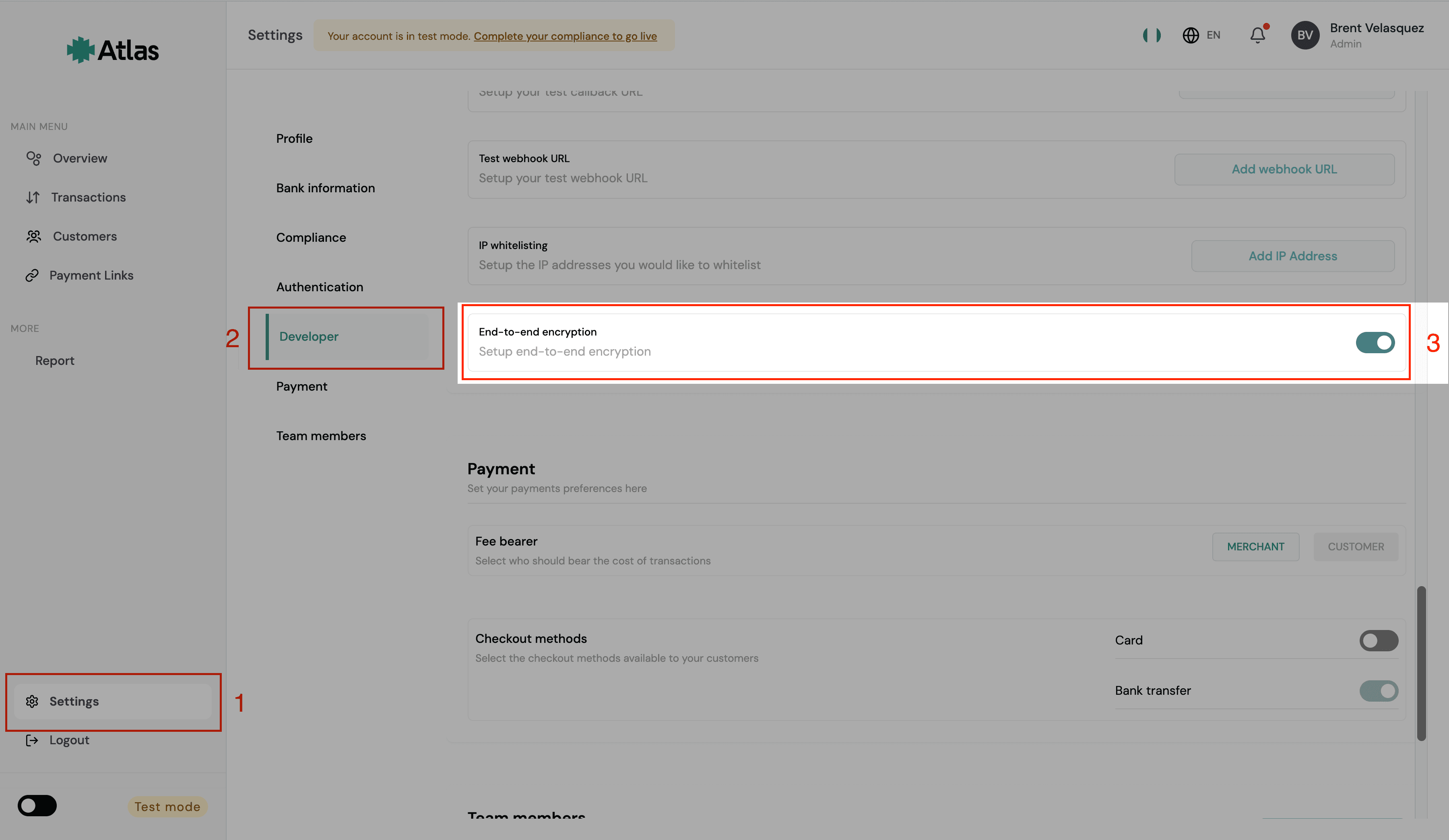
If you choose to encrypt your payloads, you need to enable this feature in your Atlas account first.
To enable or disable Atlas' end-to-end encryption on your account, navigate to Settings > Developer > End-to-end encryption and toggle the button.
Implementation examples
Here's how to implement payload encryption in different programming languages:
const crypto = require("crypto");

function encryptPayload(encryptionKey, payload) {
  // Derive encryption key from encryption key using SHA-256
  const keyBuffer = crypto
    .createHash("sha256")
    .update(encryptionKey, "utf8")
    .digest();

  // Generate random IV (12 bytes for GCM)
  const iv = crypto.randomBytes(12);

  // Create cipher
  const cipher = crypto.createCipheriv("aes-256-gcm", keyBuffer, iv);

  // Encrypt the payload
  let encrypted = cipher.update(JSON.stringify(payload), "utf8", "hex");
  encrypted += cipher.final("hex");

  // Get authentication tag
  const authTag = cipher.getAuthTag().toString("hex");

  // Format as iv:tag:ciphertext
  const encryptedData = `${iv.toString("hex")}:${authTag}:${encrypted}`;

  return { data: encryptedData };
}

// Example usage
const encryptionKey = process.env.ENCRYPTION_KEY;
const payload = {
  amount: 1000,
  currency: "NGN",
  customer_email: "customer@example.com",
};

const encryptedPayload = encryptPayload(encryptionKey, payload);
console.log(encryptedPayload);
Example unencrypted payload:
{
  "amount": 1000,
  "currency": "NGN",
  "customer_email": "customer@example.com"
}
Example encrypted payload sent to API:
{
  "data": "a1b2c3d4e5f6g7h8i9j0k1l2:m3n4o5p6q7r8s9t0u1v2w3x4:y5z6a7b8c9d0e1f2g3h4i5j6..."
}
Sending encrypted requests
Once you've encrypted your payload, send it to any Atlas API endpoint as you normally would. The only difference is that the request body contains the data field with your encrypted string instead of the regular JSON fields.
curl -X POST https://api.atlas.com/v1/payments \
  -H "Authorization: Bearer sk_test_..." \
  -H "Content-Type: application/json" \
  -d '{"data": "a1b2c3d4e5f6g7h8i9j0k1l2:m3n4o5p6q7r8s9t0u1v2w3x4:y5z6a7b8c9d0e1f2..."}'
Atlas automatically detects the encrypted format, decrypts the payload using your account's encryption key, and processes the request. The API response is returned unencrypted.
How is this guide?
Last updated on