 Atlas Documentation
Collection Workflow
Understand how inbound payments work on Atlas, including supported payment methods, fees, settlement, and how to verify payments.
Collections refer to all inflows to your Atlas account, processed via any of the supported payment options.
How it works
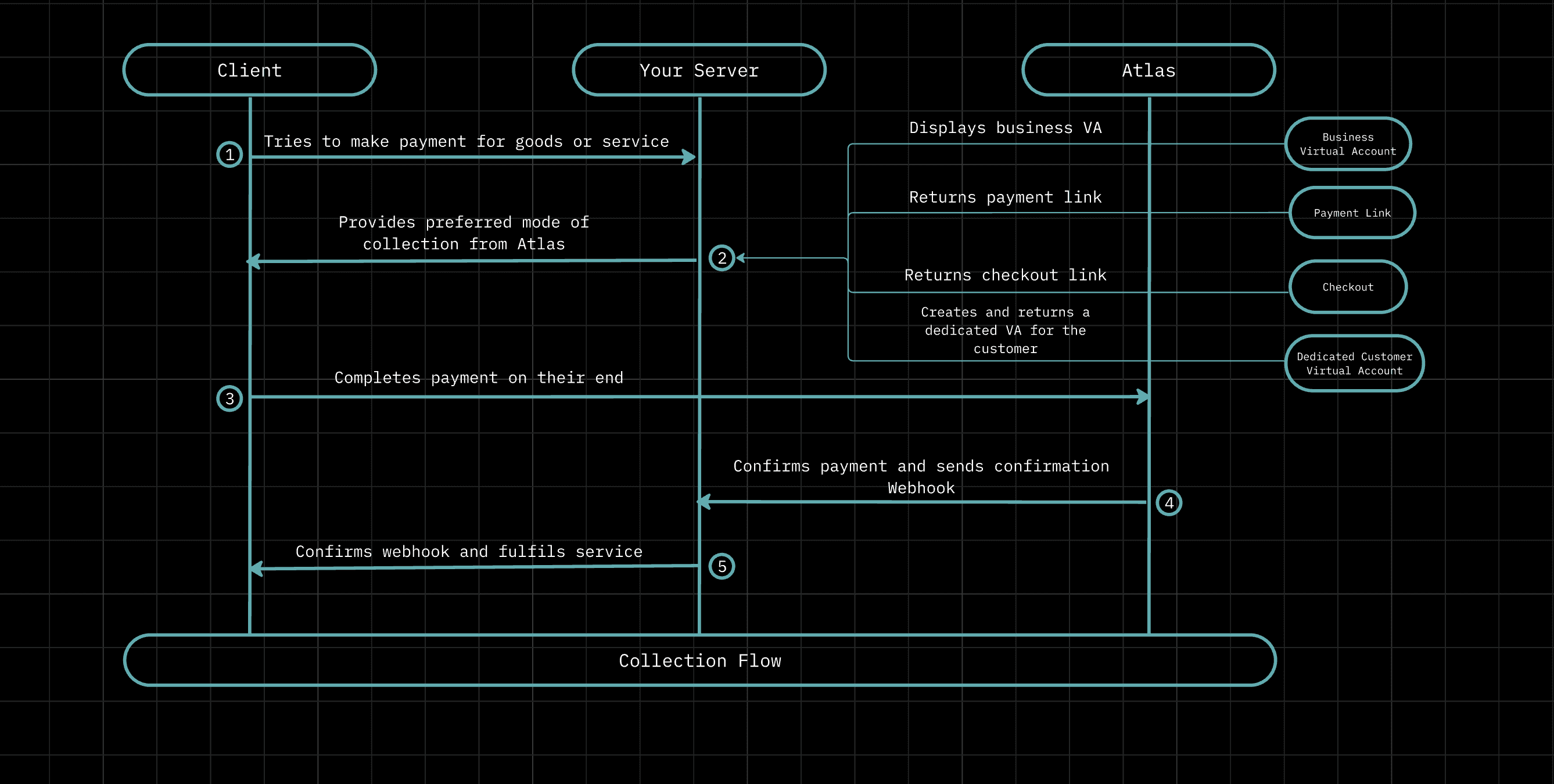
When a client is ready to pay, your server calls Atlas to get the appropriate collection method. Atlas supports four options:
- Business virtual account: a single account number tied to your Atlas account. Any transfer made to it lands in your balance. This works for simple, ad-hoc collections but makes it hard to attribute payments to specific customers or orders, since all inflows look the same.
- Payment link: a shareable link that you send to customers directly, for example via email or a messaging app. Atlas handles the payment page, so there is no checkout flow to build. A single link can collect multiple payments with no fixed expiry, and the amount can be fixed or left open for the customer to enter.
- Checkout: you initiate a checkout session from your server with the order details, and Atlas returns a hosted payment URL to redirect the customer to. Good for e-commerce flows where the payment needs to be tied to a specific order and amount.
- Dedicated customer virtual account: a unique account number assigned to a specific customer. Every deposit to that account is automatically attributed to them via webhook. This is the right choice for wallet top-ups, savings products, or any scenario where a customer will send money multiple times.
The client completes the payment entirely on their end, typically via a bank transfer. Your server is not involved in this step - Atlas receives the funds directly and credits your Atlas balance.
Once the payment is confirmed, Atlas sends a webhook to your backend. Verify the webhook signature to confirm it came from Atlas, and optionally confirm the event with the Atlas API by looking up the data.reference from the payload. Then check for duplicates to ensure you haven't already processed the same event. Only after those checks should you fulfil the order or credit the customer.
Supported payment options
Checkout
Collect payments by initiating a checkout.
Payment Links
Generate shareable payment links that can collect multiple payments.
Dedicated Virtual Accounts
Create dedicated virtual accounts for your customers with Atlas.
Fees
Each inflow incurs a flat fee of ₦10 (Ten Naira). This fee can be absorbed by you or passed on to your customer, depending on your configuration.
Fee configuration
To configure this, go to Atlas Dashboard → Settings → Payment and set your preferred fee bearer.
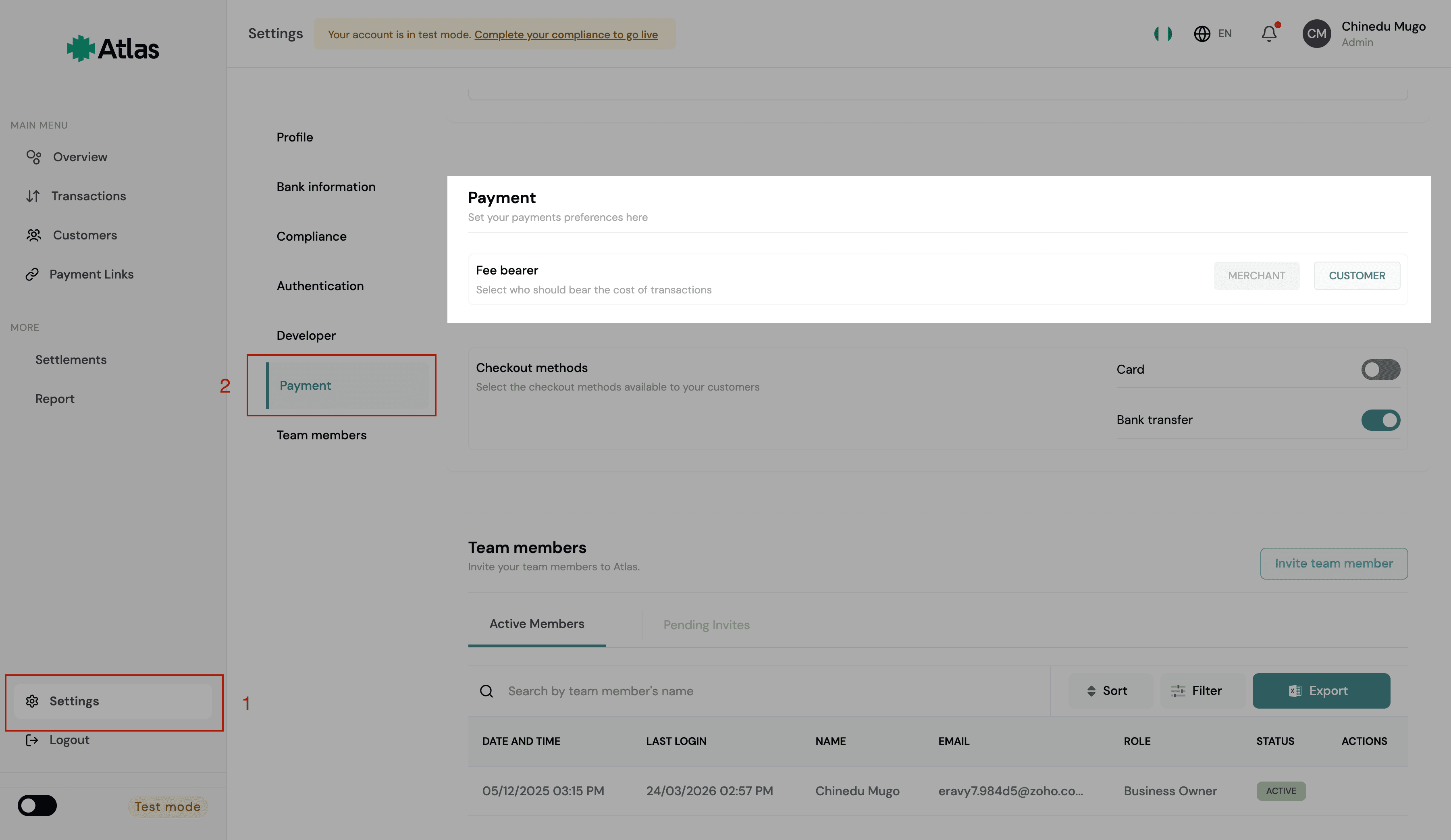
If you set the fee bearer to:
- Merchant: fees are deducted from your Atlas balance.
- Customer: fees are added on top of the payment amount for Checkout and Payment Links. Note that fees on direct inflows to your business wallet are always borne by the merchant, regardless of this setting.
You can also configure the fee bearer for individual payment links, the setting on the payment link takes precedence over the general setting.
Verifying payments
When your account receives an inflow, Atlas will notify your backend via webhook. Before fulfilling the order or service, verify that:
- The
statusisSuccessful - The
amountmatches the expected amount - The webhook is not a duplicate
Learn how webhooks work on Atlas on our webhook guide.
How is this guide?
Last updated on