 Atlas Documentation
Configure and Verify Webhooks
Set up webhook endpoints to receive real-time notifications from Atlas for inflow and outflow events, verify webhook signatures, handle duplicate events, and process payout state transitions.
Webhooks allow Atlas to notify your backend when something happens in your account (for example, a payment succeeds or a transfer settles). Instead of polling our API, you'll expose an HTTPS endpoint and Atlas will send a POST request with a JSON payload to that endpoint when a supported event happens.
Enabling webhooks on Atlas
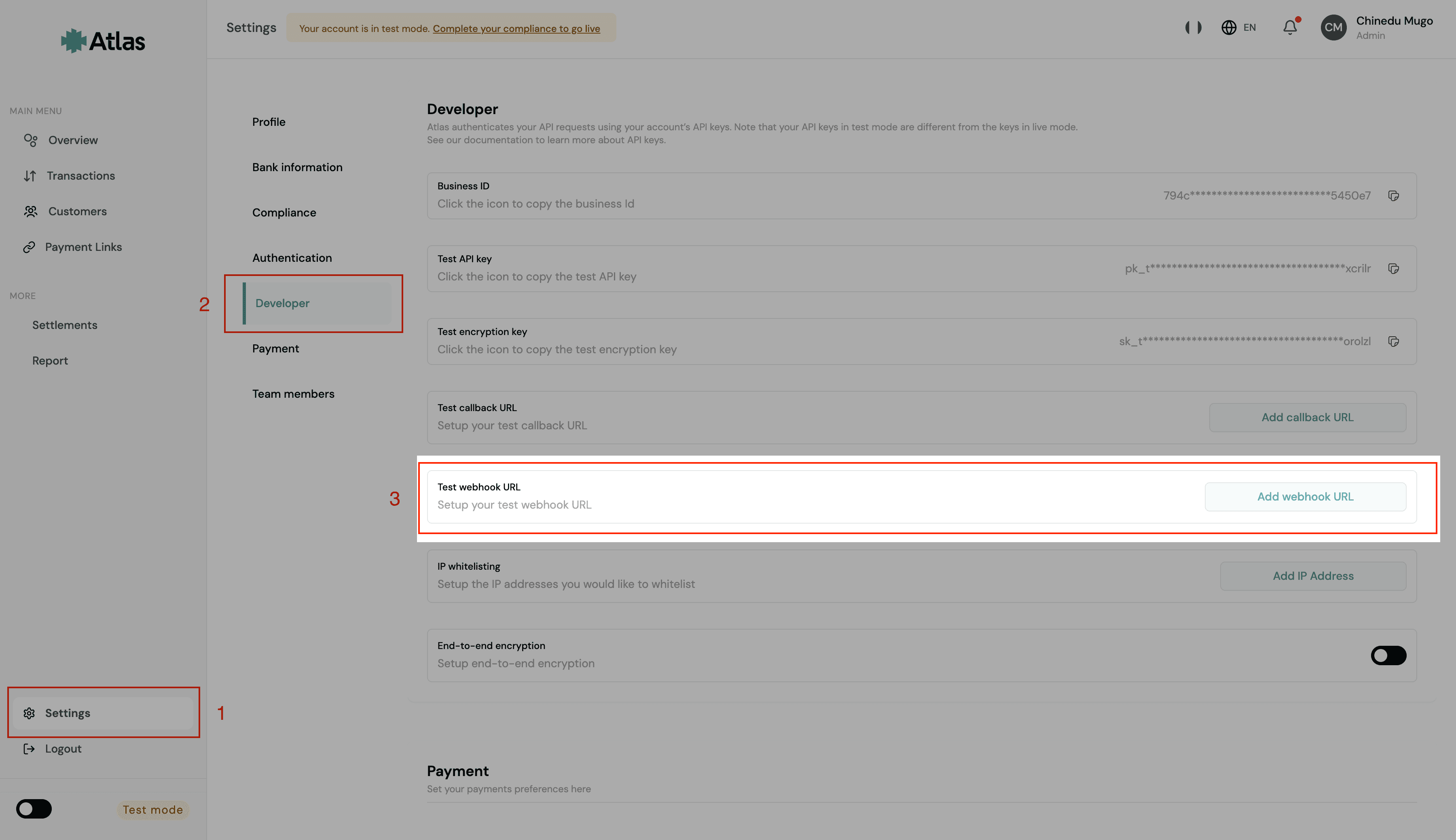
To enable webhooks on Atlas:
- Log into your Atlas dashboard.
- Go to Settings -> Developers.
- Locate the Webhook URL field, click the Add Webhook URL button, and enter your webhook URL in the input field.
Webhook events
Webhook events from Atlas are scoped according to the feature triggering them.
Virtual account events
The following events are associated with virtual accounts:
IN_FLOW_SUCCESS_EVENT: This event occurs when you receive an inflow into an Atlas virtual account. It applies to your Business virtual account and your customers' dedicated virtual accounts. This is a final state event, so you only receive it after the inflow has been completed and confirmed.
Below is an example payload for this event:
{
  "event_type": "IN_FLOW_SUCCESS_EVENT",
  "data": {
    "id": "019e6a54-26e3-7188-ba8b-1603009a026a",
    "customerAccountName": "John Doe",
    "customerAccountNumber": "7144857853",
    "customerBankName": "Wema Bank",
    "recipient": {
      "accountName": "Jane Doe",
      "accountNumber": "3769210226"
    },
    "sessionId": "586d23f6-3a21-4ff1-82f7-372bc23c30cd",
    "parentTransactionReference": null,
    "reference": "TRN_W3mZHUld59xM",
    "paymentChannel": "Bank Transfer",
    "source": "Wallet",
    "amount": {
      "value": 100090,
      "currency": "NGN",
      "formatted": "NGN 1,000.90"
    },
    "balance": {
      "value": 226031,
      "currency": "NGN",
      "formatted": "NGN 2,260.31"
    },
    "status": "Successful",
    "createdAt": "2026-05-27 16:45:00"
  }
}
Payment link & Checkout events
The following events are associated with the checkout and payment link lifecycle:
CHECKOUT_COMPLETED: The payment was successful.CHECKOUT_FAILED: The payment failed. This occurs if the customer cancels the transaction or if the transaction remains pending for too long (currently 15 minutes).
Below are examples of the payload for each event:
{
  "event_type": "CHECKOUT_COMPLETED",
  "data": {
    "checkoutReference": "CHK_123",
    "sourceReference": "SRC_456",
    "checkoutStatus": "completed",
    "isFinal": true,
    "businessId": "BUS_123",
    "customer": {
      "reference": "CUS_123",
      "email": "user@example.com",
      "name": "Jane Doe"
    },
    "checkoutAmount": {
      "value": 12000,
      "formatted": "NGN 12000",
      "currency": "NGN"
    },
    "transactionAmount": {
      "value": 10000,
      "formatted": "NGN 10000",
      "currency": "NGN"
    },
    "feeAmount": {
      "value": 200,
      "formatted": "NGN 200",
      "currency": "NGN"
    },
    "successfulTransactionReference": "TXN_789",
    "latestTransactionReference": "TXN_789",
    "paymentChannel": "bank_transfer",
    "senderName": "Jane Doe",
    "sessionId": "IJHBHJKOIJHJKO3245324RT4323R435GE",
    "processedAt": "2026-04-01T10:15:30Z",
    "completedAt": "2026-04-01T10:18:10Z",
    "failedAt": null,
    "cancelledAt": null,
    "reason": null,
    "transactionsSummary": {
      "total": 1,
      "successful": 1,
      "failed": 0,
      "pending": 0
    },
    "transactions": [
      {
        "transactionReference": "TXN_789",
        "status": "successful",
        "channel": "bank_transfer",
        "amount": {
          "value": 10000,
          "currency": "NGN",
          "formatted": "NGN 10,000.00"
        },
        "reason": null
      }
    ]
  }
}
Foreign exchange events
The following events are associated with the FX swap lifecycle:
FX_SWAP_CREATED: This event occurs when an FX swap is initiated.FX_SWAP_COMPLETED: This event occurs when an FX swap is successfully completed.
Below are examples of the payload for each event:
{
  "event_type": "FX_SWAP_CREATED",
  "data": {
    "id": "019d970c-0af7-7134-a563-aa5ab4bbed62",
    "destinationCurrency": "USD",
    "sourceCurrency": "NGN",
    "debitedAmount": {
      "value": 27000,
      "currency": "NGN",
      "formatted": "NGN27000"
    },
    "creditedAmount": {
      "value": 900,
      "currency": "USD",
      "formatted": "USD900"
    },
    "status": "pending",
    "sourceReference": "b5b9075e-3618-4a85-98cb-239ef803f57f",
    "negotiatedRate": 0.00063,
    "createdAt": "2026-04-16T17:07:22+01:00"
  }
}
Payout events
OUT_FLOW_PENDING_EVENT: This event occurs when you initiate a payout.OUT_FLOW_SUCCESS_EVENT: This event occurs when your initiated payout succeeds.OUT_FLOW_FAILED_EVENT: This event occurs when your initiated payout fails.
Below are the examples of the payload for each event:
{
  "event_type": "OUT_FLOW_PENDING_EVENT",
  "data": {
    "id": "0199e24d-e7d3-7054-860c-31934d517ee1",
    "recipientAccountName": "Test user",
    "recipientAccountNumber": "2018054387",
    "recipientBankName": "Kuda Microfinance Bank",
    "sessionId": null,
    "reference": "TRN_U5S95JEXZOON",
    "paymentChannel": "Bank Transfer",
    "amount": {
      "value": 20000,
      "currency": "NGN",
      "formatted": "NGN 200.00"
    },
    "balance": {
      "value": 4812000,
      "currency": "NGN",
      "formatted": "NGN 48,120.00"
    },
    "status": "Pending",
    "createdAt": "2025-10-14 10:39:00"
  }
}
Creating a webhook endpoint
A webhook endpoint is an HTTPS URL on your server that accepts POST requests, which Atlas uses to deliver event data to your application in real time.
Atlas only accepts a webhook URL that:
- Uses HTTPS on port
443or8443. - Resolves to a public IP address. URLs that point to private, loopback, or other internal network addresses are rejected when you save them.
- Doesn't contain credentials, such as
https://user:password@example.com.
To work correctly, your webhook endpoint must:
- Read the raw request body and verify the webhook signature before trusting the payload.
- Respond with a
2xxstatus code to acknowledge successful receipt. Atlas doesn't follow redirects, so a3xxresponse counts as a failed delivery. - Parse and process the event payload according to your application's logic.
Here are some examples of how to create a webhook endpoint in different programming languages and frameworks. Each one reads the raw body first, because the signature is computed over the exact bytes Atlas sends.
const express = require("express");
const app = express();

// express.raw keeps the body as a Buffer. Register this route before any
// global express.json() middleware, which would consume the raw body.
app.post(
  "/webhook-endpoint",
  express.raw({ type: "application/json" }),
  (req, res) => {
    const rawBody = req.body;

    // Verify the webhook signature here, using rawBody

    const event = JSON.parse(rawBody);

    // Process the event data here

    res.status(200).send("Webhook received");
  },
);
Verifying the origin of an Atlas webhook
Your webhook endpoint is public, meaning that anyone can send data to it, including malicious actors. Atlas signs every webhook it sends, so check the signature on each request before you act on the event.
Verifying the webhook signature
Every webhook request from Atlas includes two headers:
| Header | Description |
|---|---|
X-Webhook-Timestamp | The time Atlas signed the request, as a Unix timestamp in seconds. |
X-Webhook-Signature | A hex-encoded HMAC-SHA256 of the timestamp and the raw request body. |
Atlas computes the signature with your encryption key, the key that starts with sk_test_ or sk_live_ under Settings -> Developers in your Atlas dashboard. It is not the API key you send in the Authorization header. Test mode webhooks are signed with your test encryption key, and live mode webhooks with your live encryption key.
To verify a webhook:
- Read the
X-Webhook-TimestampandX-Webhook-Signatureheaders. Reject the request if either is missing. - Reject the request if the timestamp is more than 5 minutes from your server's current time. This stops an attacker from replaying a webhook they captured earlier.
- Join the timestamp, a period (
.), and the raw request body into one string, for example1759140000.{"event_type":...}. - Compute an HMAC-SHA256 of that string using your encryption key, and hex-encode the result.
- Compare your result with
X-Webhook-Signatureusing a constant-time comparison. If they don't match, reject the request with a401status code.
Use the raw request body
Compute the signature over the body exactly as you received it, before any JSON parsing. Atlas escapes characters such as / and non-ASCII letters in its payloads (for example, "ref\/123"), so parsing the JSON and serializing it again produces different bytes and a signature that never matches.
Here is a function that performs these checks:
const crypto = require("crypto");

const TOLERANCE_SECONDS = 300;

function verifyAtlasSignature(rawBody, timestamp, signature, secret) {
  if (!timestamp || !signature) return false;

  const age = Math.abs(Math.floor(Date.now() / 1000) - Number(timestamp));
  if (!Number.isFinite(age) || age > TOLERANCE_SECONDS) return false;

  const expected = crypto
    .createHmac("sha256", secret)
    .update(`${timestamp}.`)
    .update(rawBody)
    .digest("hex");

  const expectedBuffer = Buffer.from(expected);
  const signatureBuffer = Buffer.from(signature);

  return (
    expectedBuffer.length === signatureBuffer.length &&
    crypto.timingSafeEqual(expectedBuffer, signatureBuffer)
  );
}
Usage inside your webhook endpoint, before you parse the body:
const isValid = verifyAtlasSignature(
  req.body,
  req.get("X-Webhook-Timestamp"),
  req.get("X-Webhook-Signature"),
  process.env.ATLAS_ENCRYPTION_KEY,
);

if (!isValid) {
  return res.status(401).send("Invalid webhook signature");
}
Timestamps on retried webhooks
Atlas's automatic retries resend the original timestamp and signature, and a 5-minute window covers them. A webhook you retry manually from your dashboard is signed again with a new timestamp.
Regenerating your developer keys
Regenerating your developer keys from the dashboard also replaces your encryption key. Webhooks sent after that are signed with the new key, so update the key your endpoint uses at the same time.
Confirming an event with the Atlas API
A valid signature proves that Atlas sent the webhook. Before you release value based on an event, such as fulfilling an order or crediting a customer, you can also look the event up in the Atlas API as a second check. How you do this depends on the event type.
Virtual account and payout events
For IN_FLOW_SUCCESS_EVENT, OUT_FLOW_PENDING_EVENT, OUT_FLOW_SUCCESS_EVENT, and OUT_FLOW_FAILED_EVENT, look up the transaction reference (data.reference) in the payload against the Get Transaction By Reference endpoint. If the API returns a record, the event is genuine. If it doesn't, reject the request with a 401 status code.
async function verifyAtlasWebhook(reference) {
  const response = await fetch(
    `https://atlas.tryduplo.com/api/v1/transaction/find-by-reference/${reference}`,
    {
      headers: {
        Authorization: `Bearer ${process.env.ATLAS_API_KEY}`,
      },
    },
  );

  if (!response.ok) {
    return false;
  }

  const result = await response.json();
  return Boolean(result?.data);
}
Usage inside your webhook endpoint, after verifying the signature and parsing the body into event:
const reference = event.data?.reference;
const isValid = await verifyAtlasWebhook(reference);

if (!isValid) {
  return res.status(401).send("Invalid webhook source");
}
Checkout and payment link events
For CHECKOUT_COMPLETED and CHECKOUT_FAILED, look up the source reference (data.sourceReference) in the payload against the Get Checkout Transaction by Source Reference endpoint. If the API returns a record, the event is genuine. If it doesn't, reject the request with a 401 status code.
async function verifyCheckoutWebhook(sourceReference) {
  const response = await fetch(
    `https://atlas.tryduplo.com/api/v1/checkout/transactions/source-reference/${sourceReference}`,
    {
      headers: {
        Authorization: `Bearer ${process.env.ATLAS_API_KEY}`,
      },
    },
  );

  if (!response.ok) {
    return false;
  }

  const result = await response.json();
  return Boolean(result?.data);
}
Handling duplicate events
Webhook events may be delivered more than once. Your webhook logic should be idempotent, meaning that processing the same event multiple times does not cause incorrect behavior. This is important because network failures can cause Atlas to retry webhook delivery and your endpoint might acknowledge a webhook but fail during processing. If you receive an event for a transaction that has already been processed, safely ignore it.
In some cases, multiple valid events may be sent for the same transaction reference. For example, a payout transitioning from OUT_FLOW_PENDING_EVENT to OUT_FLOW_SUCCESS_EVENT.
Your integration should therefore distinguish between duplicate events (same reference and same event type) and valid state transitions (same reference, different event type).
You can detect duplicate events by keeping a record of all the webhook events processed by your system. Using these records, use the transaction reference (data.reference) as a unique identifier and track the last processed event type and current status for each transaction.
Checkout events
Checkout events (CHECKOUT_COMPLETED, CHECKOUT_FAILED) do not have a data.reference field. Use data.checkoutReference as the unique identifier for deduplication instead.
Before processing an incoming event:
- Extract the reference and event type.
- Look up the last event type you processed for that reference. If it's the same, the event is a duplicate, so ignore it and return a
2xxresponse. - Otherwise, fetch the current status from the Atlas API using the lookup for the event type in Confirming an event with the Atlas API, and store that status. Don't derive it from the event type.
- Trigger your side effects, such as fulfilling an order or notifying a customer, only when the stored status changes.
Fetching the status from Atlas keeps your record correct when events arrive out of order. A delayed OUT_FLOW_PENDING_EVENT that arrives after OUT_FLOW_SUCCESS_EVENT passes the duplicate check, but the lookup still returns the successful status, so your record doesn't move backwards and no side effects run twice.
In the examples below, fetchCurrentStatus stands for that lookup. It returns the status from the API response instead of a boolean.
const reference = event.data.reference;
const eventType = event.event_type;

const record = await db.transactions.findOne({ reference });

// Ignore exact duplicate events
if (record && record.lastEventType === eventType) {
  return res.status(200).send("Duplicate event ignored");
}

// Use the status from Atlas, not the event, which may be stale or out of order
const status = await fetchCurrentStatus(event);

if (!record || record.status !== status) {
  await handleStatusChange(reference, status);
}

await db.transactions.upsert({
  reference,
  status,
  lastEventType: eventType,
  updatedAt: new Date(),
});
Responding to the webhook
Once the webhook has been verified and accepted, return a 2xx response such as 200 OK. Atlas waits up to 30 seconds for your endpoint to respond before treating the attempt as failed,
so avoid long-running operations in the request lifecycle and process heavy logic asynchronously when possible.
If your endpoint returns a non-2xx status code (including a redirect), times out, or can't be reached, Atlas automatically retries the webhook a second and a third time, about 20 seconds apart. If none of the 3 attempts succeeds, the webhook is marked as failed, and you can retry it manually from your dashboard once your endpoint is healthy.
Manually retrying failed webhooks
Atlas exhausts its automatic retries after three failed attempts. When that happens but the cause of the failure has since been resolved, you can trigger a retry yourself so your backend still receives the event.
Retrying is useful when the event was valid but never processed on your side, for example:
- Your endpoint was down or unreachable during the delivery window, such as during a deployment, restart, or upstream outage.
- Your endpoint returned a non-
2xxresponse because of a bug, timeout, or misconfiguration that you have since fixed. - Your webhook URL was missing or incorrect when the event occurred, and you have now added or corrected it.
- Your handler processed the event incorrectly and you need Atlas to resend the payload after deploying a fix.
To retry a webhook from your Atlas dashboard:
- Log into your Atlas dashboard.
- Go to the Transactions page and locate the transaction whose webhook you want to retry.
- Click the transaction to open its details.
- Click Retry to resend the webhook to your configured webhook URL.
Note
A retried webhook is delivered to your current webhook URL, so make sure your endpoint is deployed and returning a 2xx response before you retry. Since a retry re-sends an event your backend may have already partially handled, keep your handler idempotent so repeated deliveries stay safe.
How is this guide?
Last updated on