 Atlas Documentation
Card Settlements on Atlas
Understand how card settlements work on Atlas, including settlement timelines, batching, and how funds are credited to your Zenith business account.
When a customer makes a payment to your Atlas account using a card, the transaction is authorized immediately but the funds are not credited to your account until settlement is complete. Settlement refers to the process of transferring the authorized funds from the customer's card issuer to your Zenith business account.
How settlement works
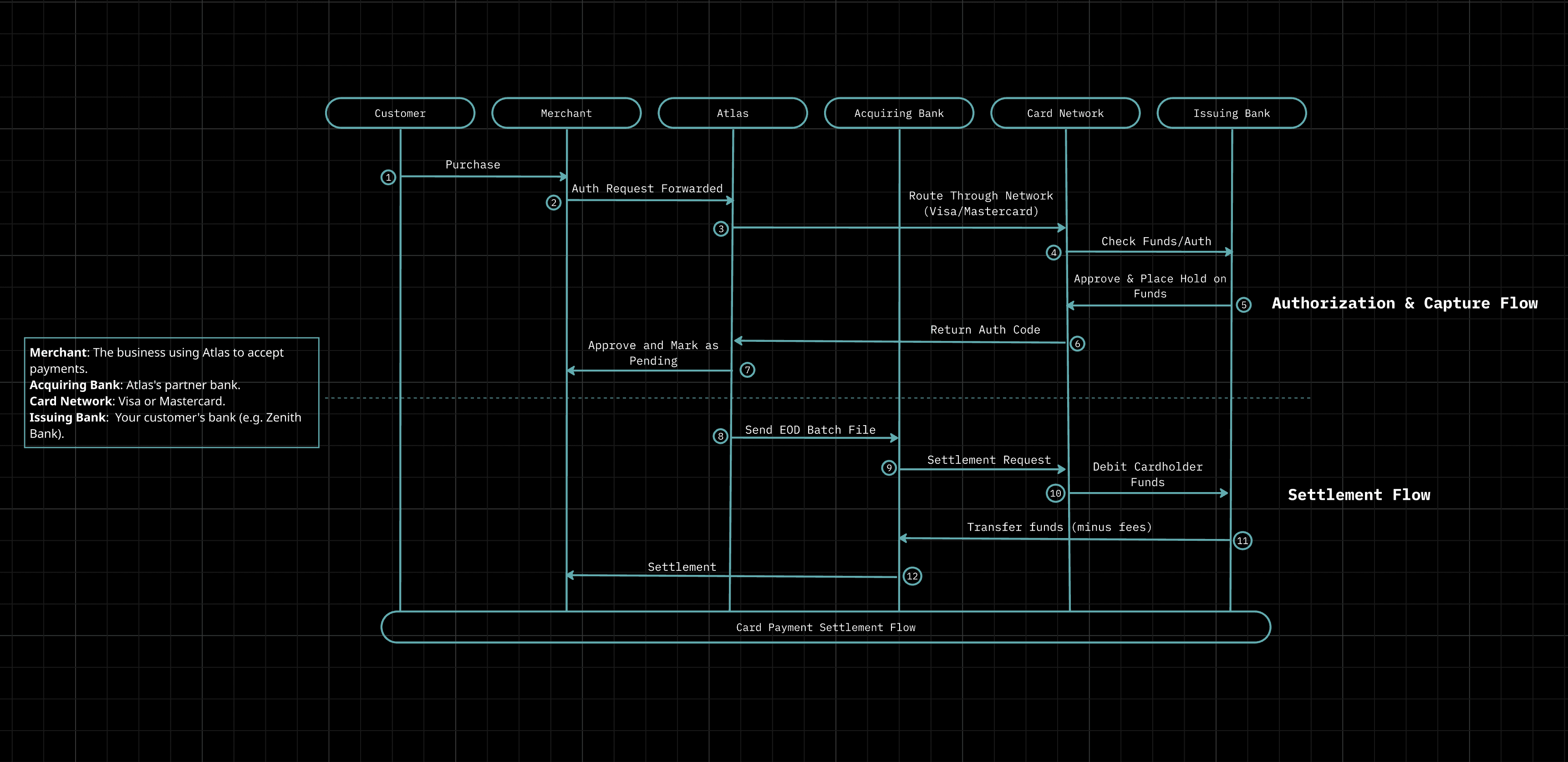
Card payments on Atlas move through the following stages before funds reach your account:
- Authorization: The customer's card issuer approves the transaction and places a hold on the funds.
- Capture: Atlas captures the authorized amount, confirming the transaction is complete.
- Batching: Captured transactions are grouped into a settlement batch at the end of each business day.
- Settlement: The card network (Visa or Mastercard) transfers the funds from the issuing bank to the acquiring bank.
- Credit: Atlas credits the net amount to your Zenith business account.
Settlement timeline
Settlement timelines on Atlas depend on whether the payment is domestic or international.
Domestic payments (cards issued in the same country as your Atlas account) follow a T+1 cycle, meaning funds are credited to your Zenith business account one business day after the transaction is captured.
International payments (cards issued outside your account's country) follow a T+7 cycle, as they involve additional processing across multiple intermediary banks and currency conversion by the card network before funds can be credited to your Zenith business account.
| Payment type | Settlement cycle |
|---|---|
| Domestic | T+1 |
| International | T+7 |
Weekends and public holidays are not counted as business days for either payment type. Transactions captured on a Friday are typically settled by the following Monday for domestic payments.
Note
Settlement timelines may vary depending on the customer's card issuer and the card network. Contact support if a settlement is delayed beyond the expected window.
Settlement statuses
Each settlement on Atlas has a status that reflects where it is in the settlement cycle.
| Status | Description |
|---|---|
PENDING | The transaction has been captured and is awaiting settlement. |
PROCESSING | The settlement batch is being processed by the card network. |
UNDER_REVIEW | The settlement has been flagged for manual review before funds are released. |
PARTIALLY_SETTLED | The transaction is currently in the batch being settled. |
SETTLED | Funds have been credited to your Zenith business account. |
FAILED | Settlement was unsuccessful. Contact support if this occurs. |
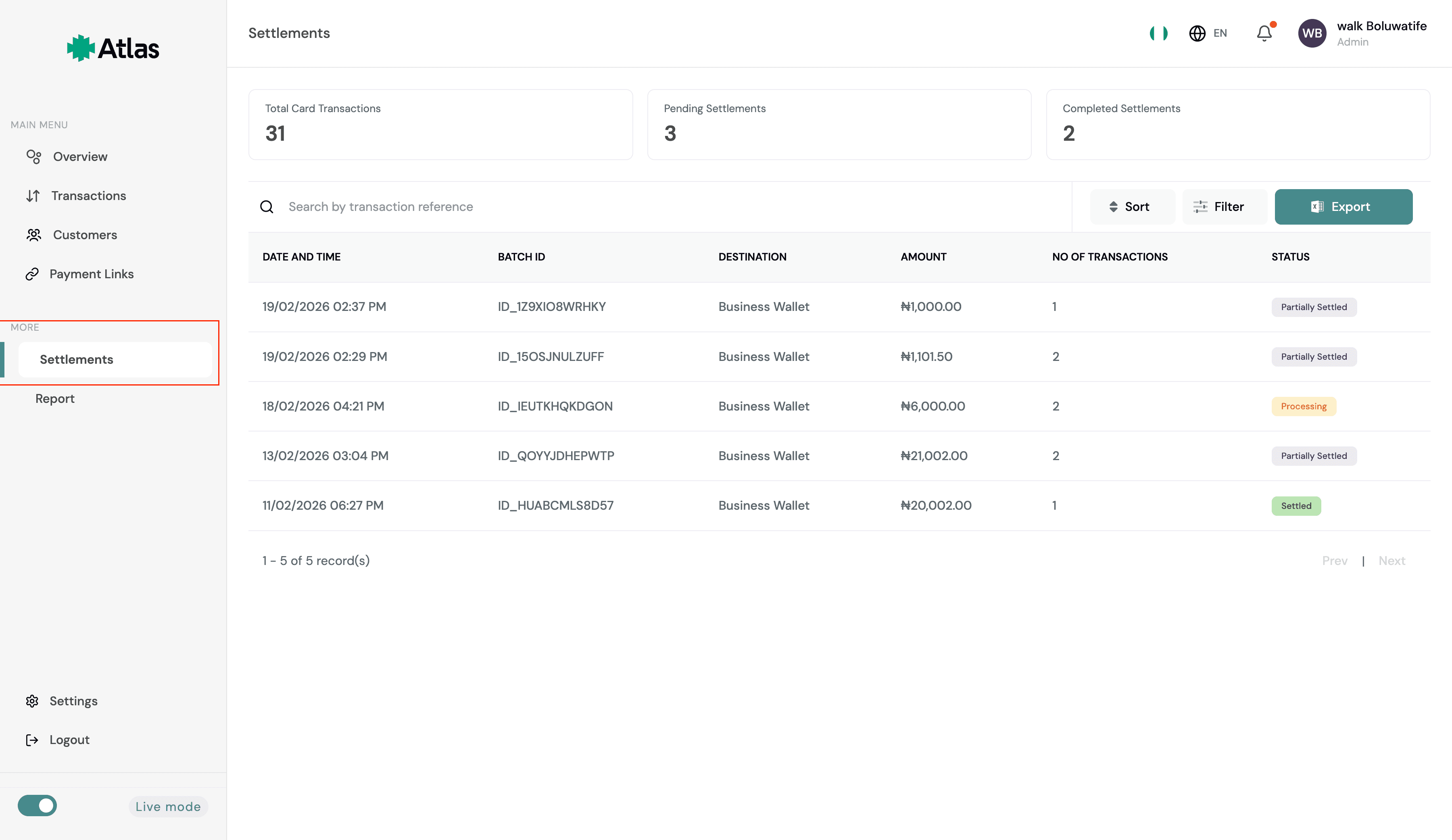
You can view the current state of your settlements under Settlements on your Atlas Dashboard.
Viewing settlements
You can view the status of card settlements from the Settlements section of your Atlas dashboard. Each settlement record shows the total captured amount, the number of transactions in the batch, fees deducted, and the net amount credited to your Zenith business account.
Settlement fees
A processing fee is deducted from each transaction before funds are credited to your Zenith business account.
| Payment type | Fee |
|---|---|
| Local | 1.5%, capped at ₦2,000 |
| International card | 4.8% |
The cap on local transactions means that for any payment above ₦133,333, the fee stays fixed at ₦2,000 regardless of the transaction amount. International card fees are uncapped and applied to the full transaction value.
Need help?
If a settlement shows a FAILED status or funds are not credited within the
expected window, contact Duplo support at support@tryduplo.com with the
settlement reference.
How is this guide?
Last updated on